The group manages a gynecology clinic and a dermatology clinic in one account, with online booking that needs no sign-up and patient check-in on a waiting-room tablet.
Challenges before adoption
- The booking system it used became unavailable, leaving bookings to phone and paper
- Durations and booking questions differ by facility and by service
- Check-ins and booking changes were concentrated at the reception desk
Results after adoption
- Online booking with no sign-up published for each facility and linked from the website
- Patients check in and book on a waiting-room tablet with their patient card number
- Bookings for both facilities visible on one board in one account
| Customer | A medical corporation (gynecology and dermatology, 2 facilities) |
|---|---|
| Product | AI Reserve Clinic |
| Adopted | November 2026 |
This medical corporation runs a gynecology clinic and a dermatology clinic. Beyond general outpatient care, the gynecology clinic offers prenatal checkups, cervical cancer screening, a fertility clinic and low-dose pill prescriptions. The dermatology clinic provides medical hair removal, laser treatments and injectables.
The corporation relied on an outside booking system. When that system became unavailable, the clinics had no choice but to take bookings by phone and keep them in a paper ledger. In November 2026 they switched to AI Reserve Clinic and started online booking and tablet check-in. Here is how it happened.
Back to phone calls and paper
Once the booking system stopped working, every booking came in by phone and was written into a paper ledger. The online booking page that patients had used disappeared too, so calls to book or change appointments all landed at the reception desk.
The gynecology outpatient clinic sees many patients throughout the day. Reception staff answered a steady stream of booking calls while also checking in patients and handling payments. On top of copying each call into the ledger, the rest of the staff could only see the schedule by looking at that ledger.
A paper ledger also makes double bookings and missed entries hard to spot. Staff had to read the ledger to tell which booking was in which consultation room. Getting a new booking system in place, and letting patients book online again, was urgent.
Different booking rules for each facility and service
When choosing a system, the corporation focused on whether it could capture the differences between facilities and services as they are.
Gynecology and dermatology differ greatly in the care they provide and the time each booking takes. Even within gynecology, what needs to be confirmed changes with whether it is a first visit and, for prenatal checkups, with the week of pregnancy and where the patient plans to give birth. In dermatology, time and price vary with the treatment and the area.
Not every service was meant to be booked online, either. Treatments that start with a consultation and classes held on fixed dates are better arranged at the desk. Being able to choose, service by service, whether to take bookings online or only by phone and at the desk was a requirement.
Online booking and tablet check-in in one system
The corporation chose AI Reserve Clinic, a booking and reception cloud for medical clinics. It valued being able to manage several facilities in one account and to run online booking with no sign-up and waiting-room tablet check-in on the same system.
First, the two facilities were registered with their opening hours, closed days and consultation rooms. The gynecology clinic has several consultation rooms, and the booking board shows a column for each.
Next, the service menu was organized for each facility. Along with durations and indicative prices, questions to ask at booking were set up. For prenatal checkups, patients are asked the week of pregnancy and where they plan to give birth (this clinic, another facility, or undecided). Answers can add time to a booking, so the time needed for care is set at the moment of booking. Services not offered online were set to be booked at the desk only.
The clinics chose not to connect the system to their electronic medical records, using it side by side with the existing records at the reception counter. Booking and check-in are handled in AI Reserve Clinic, while clinical records stay in the medical record system as before.
Booking from the website again
As soon as setup was complete, online booking was published for each facility. Patients choose a service and a time and book without signing up. They can check, change or cancel the booking from the email they receive afterwards.
The link to online booking was added to the news section of the website. After a period when booking was possible only by phone, patients can once again book at any time. Online bookings appear on the booking board straight away, with nothing to copy into a ledger.
Bookings taken by phone at the desk go onto the same board. Free rooms and times are visible at a glance, so staff no longer need to work them out from a paper ledger. The board can be open on several computers at once, so the desk and the consultation rooms see the same schedule.
Check-in on a waiting-room tablet
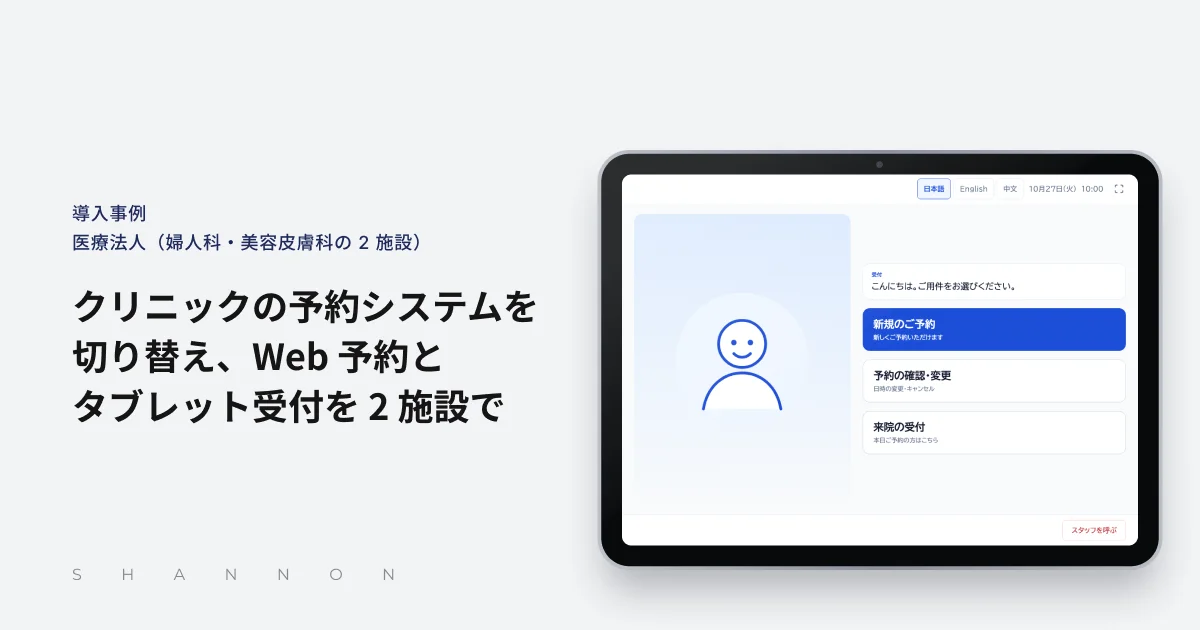
To ease the crowding at the desk, the clinic placed a tablet in the waiting room. Patients with a booking check in simply by entering their patient card number. They can also make new bookings, or change and cancel existing ones, on the tablet.
Check-ins on the tablet appear on the reception board immediately. The board refreshes itself, so staff can see who has arrived from the change in color without reloading. Bookings by first-time patients without a card number carry a “first visit” mark, and the steps for registering the number at the desk were set out.
Many of the clinic’s patients are foreign nationals. The tablet can switch from Japanese to English or Chinese, including its guidance, dates and error messages, so foreign patients can check in and book on their own. It returns to Japanese once a patient finishes, so the next patient is not confused.
Next: AI phone reception
Online booking and tablet check-in are easing the load of booking calls at the desk. The corporation plans to start using AI phone reception next.
With AI phone reception, one phone number takes bookings for both facilities. The AI first asks which facility the caller wants, confirms the service and time, and registers the booking on the board. The aim is to keep phone booking available for patients who prefer it, while letting reception staff concentrate on the patients in front of them.
Losing its booking system prompted the corporation to rethink how it takes bookings altogether. By connecting online booking, tablet check-in and AI phone reception to one booking board, it intends to run reception at both facilities on the same system.
Key features
- Multiple facilities
- Service menu and booking questions
- Online booking
- Tablet check-in
- Booking board
- Multilingual reception