AI phone answering for businesses

AI answers your phone, 24/7

AI BizCall is an AI phone answering service for businesses. AI answers calls to your company’s own 050 number 24 hours a day, 365 days a year, asks for the caller’s request, company, name and callback number, and sends a summary to the people in charge. Urgent requests are flagged and sent right away.

AI BizCall screen

Takes the request, sends a summary

The AI asks for the caller’s request, company, name and callback number, and sends a summary to the people in charge by email or chat.

Urgent calls right away

Urgent requests, or callers who need to speak to someone now, are flagged as urgent and sent to the people in charge right away.

Try it before your line opens

Use “Try talking” in the dashboard to talk to your AI receptionist from the browser before your number opens.

Demo

How it works

AI answers a call to the company’s own 050 number with the company’s name and asks for the request, company, name and callback number. When the call ends, the AI summary is saved to the call history and sent to the team chat (sample data).

Features

What AI BizCall does

Summaries, transcripts and recordings in the call history

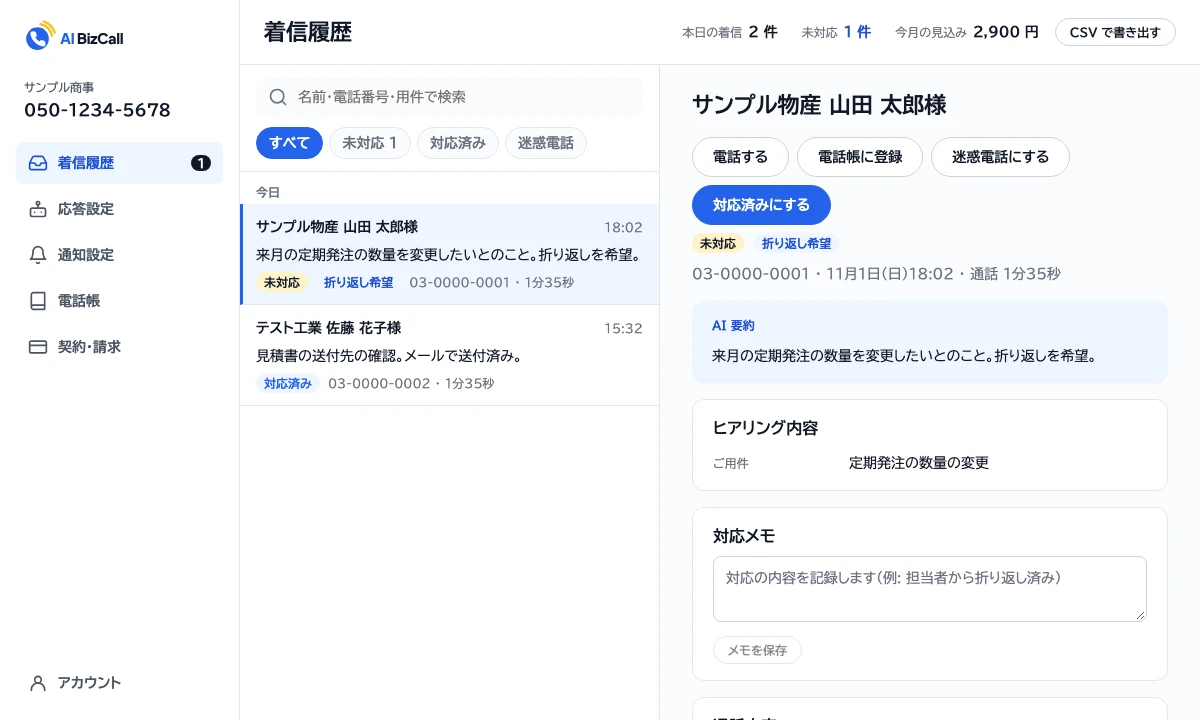
Every call the AI takes is saved to the call history with a summary, the answers to your questions and a transcript. Switch the list between open, handled and spam calls, and search by name, number or request. Leave notes on how a call was handled and mark it as handled to pass it on within the team.

  • Transcripts and recordings are kept for 30 days after the call
  • Records who marked a call as handled, and when
  • Export the contact list as CSV
The AI BizCall call history: a list of open calls and, for the selected call, the AI summary, collected answers, handling notes and transcript (Japanese screen, sample data)

Notifications in the tools you already use

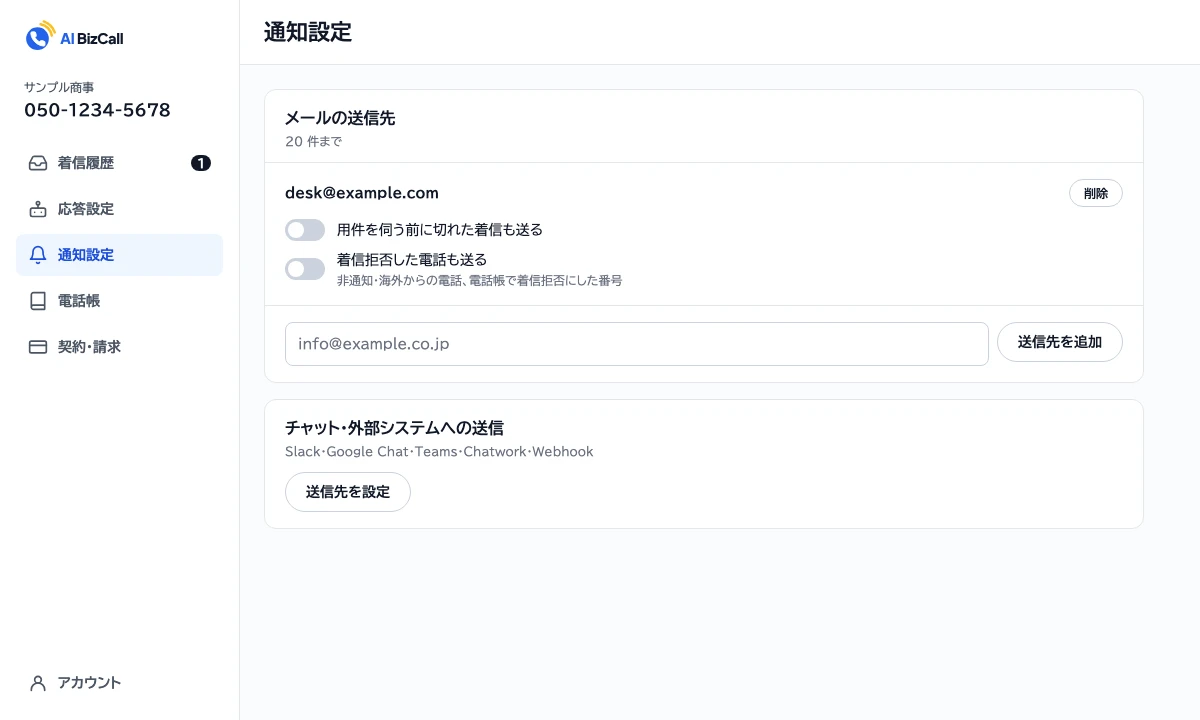
Call summaries go to email and to Slack, Chatwork, Microsoft Teams and Google Chat. Send call details to a CRM or other in-house system by webhook. Urgent requests are flagged as urgent and sent to the people in charge right away.

  • Up to 20 email recipients
  • Choose per destination whether to send dropped calls and spam
  • Send a test with a sample call to check each destination
The AI BizCall notification settings: email recipients, and sending to chat tools such as Slack and Google Chat or other systems (Japanese screen, sample data)

Set how the AI answers from the dashboard

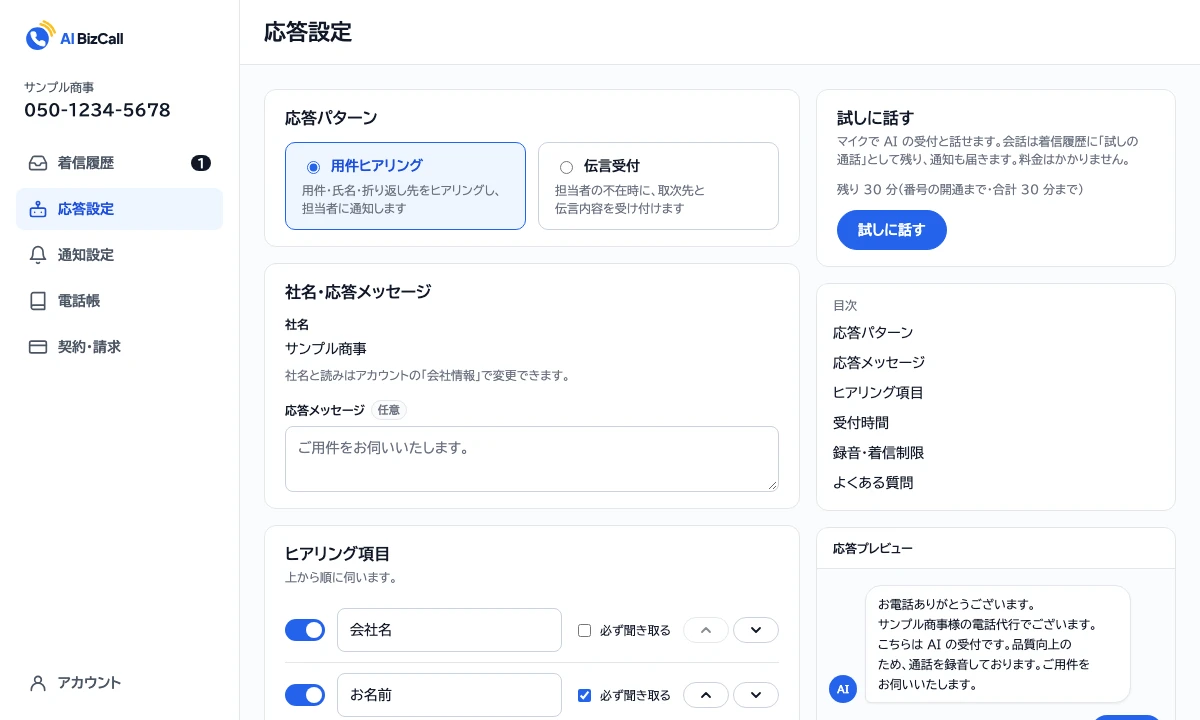
Choose between two answer patterns: request intake, which asks for the request, name and callback number, and message taking, which takes a message and who it is for when staff are away. Set the questions to ask, business hours for each day of the week with after-hours handling, and FAQs, and check how the AI will sound in the answer preview.

  • Up to 10 questions, reorderable, each optional or required
  • Up to 20 FAQs that the AI answers on the spot
  • Block numbers from the contact list, and block overseas or withheld numbers
The AI BizCall answer settings: answer pattern, company name and greeting, questions to ask, Try it out and a preview of the AI’s answer (Japanese screen, sample data)
Flow

Getting started

From sign-up to production.

  1. Register your company

    Sign up in the dashboard with your email and enter your company name and its reading. The AI uses this name when it answers.

  2. Apply for a number

    Register a payment card, then apply for a 050 number with a certificate of registered matters, the applicant’s photo ID and proof of address.

  3. Review and address check

    After review, Twilio (the carrier) sends a mail item that cannot be forwarded to your registered address, and the line opens once it is confirmed.

  4. Set up answering and notifications

    Set the answer pattern, questions and business hours, add notification destinations, and the AI starts answering.

FAQ

FAQ

AI BizCall is available to corporations only (a certificate of registered information is required).
It says, in Japanese, “Thank you for calling. This is the telephone answering service for (company name). This is the AI receptionist.” and then reads your greeting message. This introduction cannot be changed or omitted.
Yes. Use “Try talking” in the dashboard’s answer settings to talk to your AI receptionist from the browser. You can try it before your number opens.
After registering your company in the dashboard, apply from “Phone number” with a certificate of registered matters, the applicant’s photo ID and proof of the applicant’s address. A payment card must be registered before you apply. After review, Twilio (the carrier) sends a mail item that cannot be forwarded to your registered address to confirm it, and the line then opens.

Talk to us about AI BizCall.

We reply within two business days.