On 19 November 2026 the PHP project released fixed versions for every supported branch. The releases fix 18 vulnerabilities, some of which can lead to remote code execution. If you run websites or business systems on PHP, including WordPress, you need to update to the fixed versions.
This article lists the CVE numbers and descriptions of the fixed vulnerabilities and walks through the steps from identifying affected servers to updating and keeping records. The steps are also available as a ready-to-use checklist (PDF and Excel) that you can download for free later in this article.
The fixed versions released on 19 November 2026
| Branch | Fixed version | End of security support |
|---|---|---|
| 8.5 | 8.5.13 | 31 December 2029 |
| 8.4 | 8.4.28 | 31 December 2028 |
| 8.3 | 8.3.37 | 31 December 2027 |
| 8.2 | 8.2.36 | 31 December 2026 |
PHP 8.6.0, the first release of a new branch, came out on the same day and includes the same fixes. Branches 8.1 and earlier are out of security support and receive no fixes. Security support for 8.2 also ends on 31 December 2026, so plan a move to 8.3 or later alongside this update.
Vulnerabilities fixed (CVE list)
These are the vulnerabilities fixed in the 19 November 2026 releases, as published in the php.net ChangeLog.
| CVE | Description | Branches |
|---|---|---|
| CVE-2026-115560 | Session serializer mismatch can lead to remote code execution | 8.2–8.5 |
| CVE-2026-126714 | Partially overwritten session files can lead to remote code execution | 8.2–8.5 |
| CVE-2026-129496 | Timezone cache use-after-free can lead to remote code execution | 8.2–8.5 |
| CVE-2026-129474 | Use-after-free in magic method backtraces can lead to remote code execution | 8.5 |
| CVE-2026-129291 | PHP-FPM epoll use-after-free can lead to local privilege escalation | 8.2–8.5 |
| CVE-2026-129289 | PHP-FPM request smuggling through an unread HTTP request body | 8.2–8.5 |
| CVE-2026-129292 | PHP-FPM status endpoint XSS via unescaped user and script fields | 8.2–8.5 |
| CVE-2026-129538 | PHP-CGI out-of-bounds read and write during PATH_INFO correction | 8.2–8.5 |
| CVE-2026-128090 | PHAR OpenSSL signature bypass via algorithm downgrade | 8.2–8.5 |
| CVE-2026-128064 | Mixed-case HTTPS and FTPS URLs can expose data in plaintext | 8.2–8.5 |
| CVE-2026-127960 | Denial of service through folded HTTP response headers | 8.2–8.5 |
| CVE-2026-15353 | SOAP information disclosure through malformed array dimensions | 8.2–8.5 |
| CVE-2026-129506 | SOAP use-after-free when processing DTD entity references | 8.2–8.5 |
| CVE-2026-129481 | Use-after-free after interrupted session shutdown | 8.3–8.5 |
| CVE-2026-129501 | Double free during DOM XML serialization | 8.4–8.5 |
| CVE-2026-129182 | Use-after-free via repopulation of the last fatal error backtrace after shutdown | 8.5 |
| CVE-2026-129438 | Incorrect RFC 3986 URI serialization for oversized input | 8.5 |
| CVE-2026-48841 | Vulnerability in uriparser used by the URI extension (updated to uriparser 1.0.3) | 8.5 |
The most serious are the four that can lead to remote code execution (CVE-2026-115560, CVE-2026-126714, CVE-2026-129496 and CVE-2026-129474). CVE-2026-115560 was first disclosed in October 2026 and is fixed in these releases. Whether the PHP-FPM issues (CVE-2026-129291, CVE-2026-129289 and CVE-2026-129292) and the PHP-CGI issue (CVE-2026-129538) affect you depends on how PHP runs, so check that when you identify affected servers.
Steps to respond
1. Identify what is affected
Start by listing every server and service that runs PHP. Include your own servers as well as shared hosting, sites maintained by contractors and sites built on WordPress. For each server, check three things:
- PHP version: use
php -von the command line, the hosting control panel,phpinfo()and so on - How PHP runs: PHP-FPM, PHP-CGI or a web server module
- Extensions in use: session, SOAP, PHAR, DOM and so on
The PHP on the command line can differ from the PHP serving web requests, so check the version that serves the web too.
2. Decide the target version
Compare each version with the fixed versions in the table above. Anything older than the fixed version needs updating. Branches 8.1 and earlier get no fixes, so they need to move to 8.3 or later.
PHP packages shipped by Linux distributions (Ubuntu, Debian, Red Hat Enterprise Linux and others) may carry different version numbers from the php.net releases. Check the distribution’s security advisories to confirm that each CVE is fixed.
3. Update
Work through the update in this order:
- Back up code, databases and configuration files
- Update in a staging environment and check the main screens and functions
- Apply the update in production and restart PHP-FPM and the web server
- Confirm the new version on both the command line and the web
- Check the error logs and main screens
For PHP run by a hosting provider or contractor, ask when the update is scheduled and confirm that it is done.
4. If you cannot update right away
If you cannot update immediately, for example because testing takes time, narrow the exposure with the measures below and set a date for the update.
- Make the PHP-FPM status page (
pm.status_path) inaccessible from outside - Make sure PHP-CGI cannot be called directly from the web
- Disable extensions you do not use (SOAP and so on)
These measures only bridge the gap until the update. Always apply the update.
5. Record and report
For each target, record the version before and after, what was done and the date, and report to your manager and the person responsible for information security. If customers or users are likely to ask about the impact, publish the results as a notice. We published the impact on our own products in a notice (in Japanese).
A free checklist (PDF and Excel)
We have turned these steps into a checklist with boxes to tick. It covers six areas (identifying what is affected, deciding the target version, updating, what to do if you cannot update right away, recording and reporting, and preparing for next time) and includes the full CVE list for these releases.
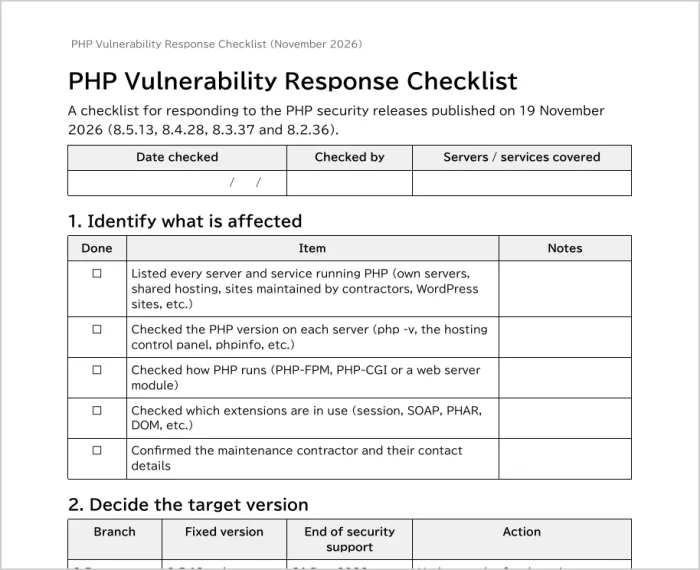
The PDF (A4, 3 pages) is for printing and filling in by hand. The Excel version adds columns for who checked each item, the date and notes, which helps when you have many servers or several people sharing the work.
Both files are generated with DocRelay, our document generation API. DocRelay produces PDF, Excel and Word files from a single template.
Turning the response into an internal manual
This will not be the last vulnerability response. Fixed versions of PHP and the other software you use will keep coming. Writing this procedure down as an internal manual means the next response goes faster, even if the person in charge changes.
Along with the checklist items, the manual should cover:
- Who checks vulnerability information and how often (php.net, JVN, distribution security advisories and so on)
- A list of the servers and services in scope, with who maintains each one or which contractor does
- The staging environment and the steps for applying an update
- Who to report to, and where records are kept
Kiteilog lets you create, revise and announce business manuals and work procedures on the same screens as your company regulations.
- Versions and change summaries: every save keeps a version, viewable in the version history alongside the summary of what changed
- Publishing and notifications: publish on a set date and notify the relevant employees by email
- Read records: when an employee opens a manual, the date, time and version are recorded, so you can check that the people involved have read the revised procedure
For templates for work procedures and information security regulations, see Kiteilog’s work procedure template and information security regulation template (both in Japanese).
Summary
The PHP releases of 19 November 2026 fix 18 vulnerabilities, including some that can lead to remote code execution. Identify the servers and services running PHP and update each to the fixed release of its branch (8.5.13, 8.4.28, 8.3.37 or 8.2.36). For 8.1 and earlier, and for 8.2, whose support ends at the end of 2026, also plan a move to 8.3 or later. Use the checklist to work through the steps, and write the procedure down as an internal manual for next time.
FAQ
Which version should we update to for the November 2026 PHP vulnerabilities?
Update to the fixed release of the branch you use: 8.5.13 or later for 8.5, 8.4.28 or later for 8.4, 8.3.37 or later for 8.3, and 8.2.36 or later for 8.2. Branches 8.1 and earlier are out of support and get no fixes, so move them to 8.3 or later.
Do we need to check PHP running on shared hosting or on sites maintained by a contractor?
Yes. The hosting provider or contractor does the update, but you should still know which version runs on each site and when it will be updated. The checklist covers contractor-managed sites in its "Identify what is affected" and "Update" sections.
What should we do if we cannot update PHP right away?
Narrow the exposure by making the PHP-FPM status page inaccessible from outside, making sure PHP-CGI cannot be called directly from the web, and disabling extensions you do not use. Then set a date for the update. These measures do not replace the update itself.